Speksifikasi Samsung Google Nexus S

.
0 komentar


Harga Samsung Google Nexus S
Saat artikel ini di posting, Samsung Google Nexus S dijual dengan kisaran harga Rp 4 jutaan.

Spesifikasi Samsung Google Nexus S
- Jaringan : 2G GSM 850 / 900 / 1800 / 1900, 3G HSDPA 900 / 1700 / 2100
- Dimensi : 123.9 x 63 x 10.9 mm
- Berat : 129 g
- Layar : Super AMOLED capacitive touchscreen, 16M colors, 480 x 800 pixels, 4.0 inches (~233 ppi pixel density)
- Oleophobic surface
- Contour Display with curved glass screen
- Multi-touch input method
- Accelerometer sensor for UI auto-rotate
- Touch-sensitive controls
- Proximity sensor for auto turn-off
- Three-axis gyro sensor
- Kamera : 5 MegaPiksel, autofocus, LED flash, Geo-tagging, touch focus, video WVGA@30fps
- Kamera sekunder: VGA
- OS : Android OS, v2.3 (Gingerbread)
- Prosesor : 1 GHz ARM Cortex-A8 processor, PowerVR SGX540 GPU, Hummingbird chipset
- Memori internal 16GB storage, 512 MB RAM
- Messaging : SMS(threaded view), MMS, Email, Push Mail, IM, RSS
- Konektivitas : GPRS, EDGE, 3G, Wi-Fi 802.11 b/g/n, DLNA, Wi-Fi hotspot, Bluetooth v2.1 with A2DP, USB v2.0 microUSB
- HSDPA, 7.2 Mbps; HSUPA, 5.76 Mbps
- Games
- Baterai: Standard battery, Li-Ion
- GPS with A-GPS support
- Browser: HTML
- Java via Java MIDP emulator
- Fitur Lain: Digital compass, MP4/H.264/H.263 player, MP3/WAV/eAAC+/AC3 player, Organizer, Image/video editor, Google Search, Maps, Gmail, YouTube, Calendar, Google Talk, Picasa integration, Flash Player v10.1, Voice memo/dial/commands, Predictive text input, Near Field Communications

READ MORE - Speksifikasi Samsung Google Nexus S

Speksifikasi Samsung Galaxy Young S5360

.
0 komentar

Spesifikasi Samsung Galaxy Young S5360
Samsung Galaxy Young S5360

Spesifikasi Samsung Galaxy Young S5360 :
General
2G Network :
GSM 850 / 900 / 1800 / 1900
3G Network :
HSDPA 900 / 2100
Size
Dimensions :
104 x 58 x 11.5 mm
Weight :
97.5 g
Display
Type :
TFT capacitive touchscreen, 256K colors
Size :
240 x 320 pixels, 3.0 inches (~133 ppi pixel density)
- TouchWiz UI
- Touch sensitive controls
- Multi-touch input method
- Proximity sensor for auto turn-off
Sound
Alert types :
Vibration, MP3 ringtones
Loudspeaker :
Yes
3.5mm jack :
Yes
Memory
Phonebook :
Practically unlimited entries, Photocall
Call records :
Yes
Internal :
180 MB, 290 MB RAM
Card slot :
microSD, up to 32GB, buy memory
Data
GPRS :
Yes
EDGE :
Yes
3G :
HSDPA, 7.2 Mbps
WLAN :
Wi-Fi 802.11 b/g/n, Hotspot functionality
Bluetooth :
Yes, v3.0 with A2DP, HS
Infrared port :
No
USB :
Yes, microUSB v2.0
Camera
Primary :
2 MP, 1600x1200 pixels
Features :
Geo-tagging
Video :
Yes, QVGA@15fps
Secondary :
No
Features
OS :
Android OS, v2.3.5 (Gingerbread)
CPU :
830 MHz ARMv6 processor
Messaging :
SMS(threaded view), MMS, Email, Push Email, IM
Browser :
WAP 2.0/xHTML, HTML
Radio :
Stereo FM radio with RDS
Games :
Yes + downloadable
Colors :
Metallic Gray
GPS :
Yes, with A-GPS support
Java :
Yes, MIDP 2.1
- SNS integration
- MP4/WMV/H.264 player
- MP3/WAV/eAAC+ player
- Organizer
- Image/video editor
- Google Search, Maps, Gmail,
YouTube, Calendar, Google Talk, Picasa integration
- Quickoffice document viewer
- Voice memo/commands
- Predictive text input (Swype)
Battery
Standard :
battery, Li-Ion 1200 mAh
Stand-by :
Up to 850 h (2G) / Up to 540 h (3G)
Talk time :
Up to 17 h (2G) / Up to 6 h 20 min (3G)

READ MORE - Speksifikasi Samsung Galaxy Young S5360

Spesifikasi Samsung Galaxy Ace S5830

.
0 komentar

harga samsung galaxy ace


Dan berikut ini adalah spesifikasi Samsung Galaxy Ace S5830

Jaringan
GSM 850/900 /1800/1900 dan HSDPA 900 / 2100
Processor
Qualcomm QCT
MSM7227-1 Turbo
800 MHz processor SAR Rating
ukuran 112.4 x 59.9 x 11.5(mm) dengan berat 113 gram
TFT capacitive
touchscreen, 16M colors
SizeDisplay
320 x 480 pixels, 3.5inchi
MenuTouchscreen :
TouchWiz v.30 UI
Touchscreen : Touch-
sensitive,Swype text
Memory Internal 158 MB ,Expansion microSD, up to 32GB
TypeStandard battery, Li-Ion 1350 mAh
Stand-by (hrs)Battery
Up to 640 hours
(2G) / Up to 420 hours (3G) ,TalkTime(min)
Up to 660 min (2G)
/ Up to 390 min (3G)
Polyphonic Ringtones
Format MP3/WAV/eAAC+
player,MP3 Player,AudioVoice
FM Radio,A2DP,FormatMP4/H.264/H.263 player
VideoRecorder,WVGA@30fps
Push-To-Talk
akser data
HSDPA,HSDPA, 7.2Mbps
EDGE
Bluetooth, v3.0 dengan A2DP,3G dan GPRS,USB Port,WIFI/WLANYes, Wi-Fi 802.11 b/
g/n,DLNA,Data Cable,Data Modem
Platform OSAndroid OS – 2.2 Froyo
Browser HTML
Predictive Text Entry
Software Speech Codes PIM Application
tipe kamera CMOS, 5.0
Megapixel dengan Digital zoom
2592 x 1944 pixelsMax.Resolution
Flash,Camera
Multi Shot Frame,LED Flash,dan Geo Tagging.

READ MORE - Spesifikasi Samsung Galaxy Ace S5830

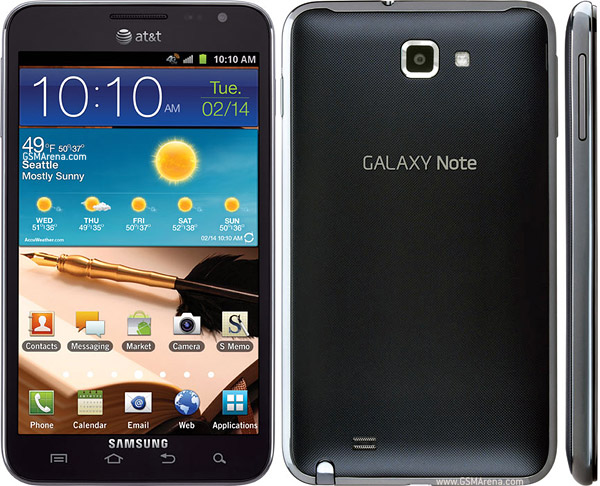
Speksifikasi Samsung Galaxy Note I717

.
0 komentar


General
  :
2G Network     GSM 850 / 900 / 1800 / 1900
3G Network     HSDPA 850 / 1900 / 2100
4G Network     LTE 700 MHz Class 17 / 1700 / 2100
Announced    
2012, January
Status   
Available. Released 2012, January
Body    
Dimensions     146.8 x 83 x 9.7 mm
Weight     178 g
     - Touch-sensitive controls
Display     Type     Super AMOLED capacitive touchscreen, 16M colors
Size     800 x 1280 pixels, 5.3 inches (~285 ppi pixel density)
Multitouch     Yes
Protection    
Corning Gorilla Glass
     - TouchWiz UI
Sound    
Alert types     Vibration; MP3, WAV ringtones
Loudspeaker     Yes
3.5mm jack     Yes
Memory    
Card slot     microSD, up to 32GB
Internal    
16GB storage, 1 GB RAM
Data    
GPRS     Yes
EDGE     Yes
Speed    
HSDPA, 21 Mbps; HSUPA, 5.76 Mbps; LTE
WLAN    
Wi-Fi 802.11 a/b/g/n, DLNA, Wi-Fi Direct, Wi-Fi hotspot
Bluetooth    
Yes, v3.0 with A2DP, EDR
NFC     Yes
USB     Yes, v2.0 microUSB (MHL), USB On-the-go
Camera    
Primary     8 MP, 3264x2448 pixels, autofocus, LED flash
Features     Geo-tagging, touch focus, face and smile detection, image stabilization
Video     Yes, 1080p
Secondary     Yes, 2 MP
Features    
OS :     Android OS, v2.3 (Gingerbread)
Chipset :    Qualcomm MSM8660 Snapdragon
CPU :    Dual-core 1.5 GHz Scorpion
GPU :    Adreno 220
Sensors :    Accelerometer, gyro, proximity, compass, barometer
Messaging :    SMS(threaded view), MMS, Email, Push Mail, IM, RSS
Browser :    HTML, Adobe Flash
Radio :    No
GPS :    Yes, with A-GPS support and GLONASS
Java :    Yes, via Java MIDP emulator
Colors :     Carbon Blue, Ceramic White
     - S Pen stylus
- Active noise cancellation with dedicated mic
- TV-out (via MHL A/V link)
- SNS integration
- MP4/DivX/XviD/WMV/H.264/H.263 player
- MP3/WAV/eAAC+/AC3/FLAC player
- Organizer
- Image/video editor
- Document editor (Word, Excel, PowerPoint, PDF)
- Google Search, Maps, Gmail,
YouTube, Calendar, Google Talk, Picasa integration
- Voice memo/dial/commands
- Predictive text input (Swype)
Battery           Standard battery, Li-Ion 2500 mAh
Stand-by     Up to 252 h
Talk time     10 h
READ MORE - Speksifikasi Samsung Galaxy Note I717

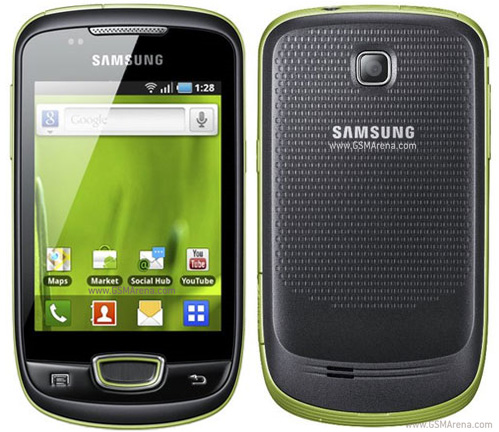
Speksifikasi Samsung Galaxy Mini (GT-S5570)

.
0 komentar

General Network GSM 850 / 900 / 1800 / 1900
HSDPA 900 / 2100
Announced 2011, 1Q
Processor
SAR Rating
Color Available Black
Size Dimensions (mm) 110.4 x 60.8 x 12.1
Weight (g) 105
Display Type TFT capacitive touchscreen, 256K colors
Size 240 x 320 pixels, 3.14 inches
Lines 0
Menu Touchscreen : TouchWiz v3.0 UI
Design Type Blok
Antenna Fixed Internal
Keys Navigation Touchscreen : Swype text input method
QWERTY No
Soft
Other Accelerometer sensor, Proximity sensor
Lighting
Memory Phonebook
Internal (MB)
Expansion
Battery Type NULL
Stand-by (hrs)
TalkTime(min)
Ringtones Polyphonic
Customization Yes
Audio Format MP3/WAV/eAAC+ player
MP3 Player Yes
Voice
FM Radio Yes
A2DP Yes
Video Format MP4/H.264/H.263 player
Recorder Yes, QVGA@15fps
TV Null
Entertainment Games Yes + downloadable
Messaging SMS Yes
Total SMS 1000
MMS Yes
EMS Yes
Email Yes
IM
Push-To-Talk
Connectivity HSDPA Yes, HSDPA, 7.2 Mbps
EDGE Yes
Bluetooth Yes, v2.1 with A2DP
3G Yes
GPRS Yes
Infrared (IrDA) No
USB Port Yes
WIFI/WLAN Yes, Wi-Fi 802.11 b/g/n
Data Cable Yes
Data Modem
Software Java (J2ME) Yes
WAP Not Supported
Platform OS Android OS – 2.2 Froyo
Browser HTML
Predictive Text Entry
Speech Codes
PIM Application
Others Application A-GPS, Digital Compass, SNS integration, Document viewer/editor, Image/video editor, Google Search, Maps, Gmail, YouTube, Calendar, Google Talk, Picasa integration
Personal Themes No Info.
Caller ID Yes
Profile ID Yes
Camera Lens Type CMOS, 3.0 Megapixel
Digital zoom
Max. Resolution 2048×1536 pixels
Flash No
Night Mode No
Multi Shot
Frame Types
Extra Features Geo Tagging
Photo Format

READ MORE - Speksifikasi Samsung Galaxy Mini (GT-S5570)

Istilah - Istilah Android

.
0 komentar

Android  adalah sistem operasi besutan Google yang sekarang sedang marak di pasaran smartphone, tablet, dan aplikasi-aplikasinya. karena sistem operasi ini free dan open source, untuk memaksimalkan penggunaan device android, penggunanya dituntut untuk setidaknya mau belajar teknologi.

1. Versi
Seperti halnya Operating System lainnya, Android pun memiliki versi-versi yang selalu mengalami penyempuranaan atau penambahan fitur. nama yang digunakan pada tiap versi mengacu pada dessert (makanan penutup) urut abjad.

Cupcake (versi 1.5)
Donut (versi 1.6)
Eclair (versi 2.0/2.1)
Froyo (versi 2.2)
Gingerbread (versi 2.3)
Honeycomb (versi 3.x)
Ice Cream Sandwidch (versi 4.0) <– yang ini panjang amat
Jelly beans (versi ??)
untuk detail masing versi silakan googling sendiri  . versi Android yang resmi dirilis oleh google memang mulai dari C, tau kenapa ? karena "abjad A = apple , B = blackberry


2. ROM (Read Only Memory)
 memory tempat menyimpan firmware dan file-file OS

3. Firmware
 semacam Operating System yang disimpan di ROM yang menjembatani antara device dan aplikasi-aplikasi serta user.
pada android, istilah firmware dan ROM tertukar-tukar, ada juga yg mendefinisikan ROM sebagai sistem utama OS, dan firmware adalah versi dari sistem utama tersebut. misal ROM = android, firmware=2.2.1. sehingga ada istilah stock rom,custom rom

4. Stock ROM
sistem resmi yang dibuat oleh produsen device (kumpulan ROM milik samsung dapat dilihat di samfirmware.com)


5. Custom ROM
stock ROM yang dimodifikasi oleh developer-developer, salah satu contoh custom rom adalah rom2 yg dikeluarkan oleh cyanogen mod.

6. Flashing
menginstall firmware/ROM pada device. biasanya dengan menggunakan tools pada komputer seperti odin. tutorial untuk flashing dpt dilihat di sini saya rasa untuk sebgaian besar device android caranya sama

7. Apk (Android Package)
ekstensi file/jenis file installer aplikasi2 android

8. Adb (Android Debug Bridge)
command line tool pada komputer yang bisa berkomunikasi dengan device atau emulator android atau dengan kata lain menjembatani PC dengan android device via command line. terletak pada folder /platform-tools/ di direktori Android SDK. tutrorial menggunakan ADB dapat dilihat di sini.

9. Launcher
tampilan pada layar utama dan app drawer

 10. Widget
aplikasi yang dapat dimunculkan pada layar utama dan dapat berinteraksi langsung di layar utama (bukan shortcut)

 11. Live wallpaper
background wallpaper yang dapat bergerak gerak dan terkadang gerakannya tergantung input user (misal sentuhan pada live wallpaper nexus)

 12. Apps2sd
memindahkan file-file aplikasi dari internal storage ke external storage (sd card) secara manual. temennya >> move2sd enabler *root membuat permanen app yg di instal otomatis masuk ke external. gurunnya >> a2sd GUI, melakukan swap, memindai cache pada internal ke ext, app internal bisa pindah ke partisi ext

 13. Root
tindakan memberikan akses super user pada pengguna dan aplikasi-aplikasi yang membutuhkan akses super user (misal universal androot). setelah device di-root, akan muncul sebuah aplikasi bernama Superuser. Ada yang berpendapat kalau root akan menghilangkan garansi, tapi ada juga yang berpendapat kalau mau klaim garansi cukup di-unroot atau di flash  .

14. Download mode
kondisi device yang siap menerima firmware baru. pada device saya, dapat dilakukan dengan menekan tombol volume down + tombol tengah D-pad + tombol power saat device dalam keadaan mati. jenis device yang berbeda memiliki cara yang berbeda pula.


15. Recovery mode
kondisi device untuk melakukan recovery apabila terjadi suatu error (misal aplikasi2 penting sering force close). akan muncul pilihan:

wipe data/factory reset = sama seperti factory reset
wipe cache partition = menghapus partisi pada SDCard
reboot system now = restart
apply sdcard/update.zip = untuk mengupgrade firmware lewat file pada SDCard

pada device saya, dapat dilakukan dengan menekan tombol volume up + tombol tengah D-pad + tombol power saat device dalam keadaan mati. jenis device yang berbeda memiliki cara yang berbeda pula.


16. Safe mode
kondisi device masuk ke OS dengan jumlah aplikasi minimal yang terload (sama seperti pada OS Windows) pada device saya, dapat dilakukan dengan menyalakan device seperti biasa, lalu menekan tombol tengah D-pad lama sampai terasa getar pendek dan getar panjang saat device masuk ke bootanimation. jenis device yang berbeda memiliki cara yang berbeda pula.


17. Bootanimation
animasi pada saat booting, dapat diganti jika sudah mendapat akses super user atau lewat command line adb. kalo mau custom sendiri sebenernya gampang. kesalahan dapat mengakibatkan bootloop.


18. Framework
tampilan-tampilan dasar pada firmware, seperti battery bar, signal bar, notification bar. dapat dicustom dengan mengedit file framework-res.apk dan twframework-res.apk pada folder /system/framework. tentu saja dengan akses superuser  kesalahan dapat mengakibatkan bootloop. salah satu tutorial memodifikasi framework dapat dilihat di sini. hati-hati, DWYOR!!!


19. Hard reset
mengembalikannya ke kondisi awal ROM (virgin). cara hard reset pada tiap device berbeda-beda. misal pada samsung dengan kode * 2767 * 3855 #. WARNING!! begitu kode dimasukkan, proses hard reset akan langsung berjalan dan tidak dapat dicancel. hard reset akan mengakibatkan:

menghapus contact,sms,pengaturan2 aplikasi,user accounts,aplikasi-aplikasi yang sudah diinstall oleh user, termasuk root
mengembalikan aplikasi-aplikasi awal ROM
mereset file system


20. Factory reset
reset ini hanya akan menghapus app data, setting aplikasi, dan user information. Factory reset dapat dilakukan pada Settings>Privacy> Factory Data. Atau pada device samsung dapat memasukkan kode *#*# 7780 #*#*. Factory reset akan mengakibatkan:

menghapus contact,sms,pengaturan2 aplikasi,user accounts,aplikasi-aplikasi yang sudah diinstall oleh user, termasuk root
tidak mengubah file system (framework, bootanimation, dkk)

21. Brick
kerusakan pada android akibat kesalahan flashing, misal kabel lepas saat di tengah-tengah proses flash, atau pc mati mendadak, atau program flashing not responding. tandanya adalah device matot alias mati total. solusi: di service  atau saya sempat mendapati tools untuk unbrick, cuma belum pernah nyobain

22. Bootloop
device melakukan boot terus menerus (berulang-ulang) / terjebak di bootanimation, tidak dapat masuk ke OS. akibat kesalahan flashing atau ada file milik system yang tidak berjalan dengan baik. bootloop dapat diatasi dengan wipe data & wipe cache partition atau kalau masih bootloop dapat diflash ulang

23. Jit(just in time)
 dalam android jit semacam tweaking agar procie dan I/O device dapat bekerja maksimal

24. Android sdk (software development kit)
tool-tool yang berguna untuk mengembangkan aplikasi di atas android

25. CWM / Clockwork mod 
recrovery mode yg sudah di oprek sama developer

26. Overclock 
 menaikan kemampuan prosesor di atas normal (hal hal yg terjadi bervariasi, beberapa tidak mengalamin variasi itu atau tidak ada masalah)
READ MORE - Istilah - Istilah Android

CyanogenMod for Samsung Galaxy Mini (SquadZone)

.
0 komentar

===============CyanogenMod 7==================

CyanogenMOD 7.2.0 RC5.5 [Flash Via CWM]
http://www.mediafire.com/?be41t4vff9ed893
Update I : http://www.mediafire.com/?7a3c2i9evb0o2cj (Do Not Download)
Update II : http://www.mediafire.com/?aii314au7xrbp63 (Must Download)
Update III:http://www.mediafire.com/?9f6rquwcrpeo431 (Must Download)
MUST WIPE DATA AND CACHE AFTER APPLY ALL UPDATE

CyanogenMOD 7.2.0 RC5.4 [Flash Via CWM]
http://www.mediafire.com/?clp7guewkwdn6ae
Update I : http://www.mediafire.com/?46j4l8q6bntf96c
Update II : http://www.mediafire.com/?rpplfegd929g236

CyanogenMOD 7.2.0 RC5.3 [Flash Via CWM]
http://www.mediafire.com/?9d706ol5nj769n7
Update I : http://www.mediafire.com/?ibrkzx7mlpadipt
Update II : http://www.mediafire.com/?dsmda0873sczw0c
Update III : http://www.mediafire.com/?4ju6k8u4d7pizc5 (optional)

CyanogenMOD 7.2.0 RC5.2 [Flash Via CWM]
http://www.mediafire.com/?nc92kvr5uvv8yz2
Update I : http://www.mediafire.com/?5rswf0fxf2ds2i2 (must download)
Update II : http://www.mediafire.com/?tt75lur1frw71hm (must download)

CyanogenMOD 7.2.0 RC5.0.1 [Flash Via CWM]
http://www.mediafire.com/?e6v6772o6q0f4s5
Update I : http://www.mediafire.com/?cw04drlbo4sd30q
Update II : http://www.mediafire.com/?c4uo85a1cxbpgr8

CyanogenMOD 7.2.0 RC5 [Flash Via CWM]
http://www.multiupload.com/G0EZ1R48O4
(mirror) http://www.mediafire.com/?8auis07iqhcbw8u (password : myandroid007)

CyanogenMOD 7.2.0 RC4 [Flash Via CWM] password : harry
http://www.mediafire.com/?vpj8cd6q3ahu30s

CyanogenMOD 7.2.0 RC3 [Flash Via CWM]
http://www.mediafire.com/?dwhtgwgul7dze7i
Fix Bug Video Codec : http://www.megaupload.com/?d=5L3TSM29

CyanogenMOD 7.2.0 RC2 [Flash Via CWM]
http://www.mediafire.com/?qdbgnkfpu0j90fu
Plugins : http://www.mediafire.com/?d609am4uwav7li0

CyanogenMOD 7.2.0 RC1 (STABLE) [Flash Via CWM]
http://www.mediafire.com/?n4emkl05hrtrn4g

Build 17-11-2011 (STABLE) [Flash Via CWM]
http://www.mediafire.com/?nncn5x9utwa4p1n

Build 15-11-2011 [Flash Via CWM]
http://www.mediafire.com/?y138yubdggpiddu

Build 13-11-2012 [Flash Via CWM]
http://www.mediafire.com/?29gn3468on4yzho

[OPTIONAL]
Statusbar + Soft Key for CM7 Variant - Tablet Tweaks (Add Soft-Key Options) 
Download : http://db.tt/VacN9Z4c   
How To Install :
  • Reboot to Recovery Mode
  • Select install zip from sd card
  • Select choose zip from sd card
  • Find "tablet_tweaks_final.zip"
  • Select Yes
  • Select reboot system now

(For the Change Log and the update informations,  please visit the XDA)
Source :
[ http://forum.xda-developers.com/showthread.php?t=1344440 ] CM7


==============CyanogenMod 9===============


[NEW] CyanogenMOD 9.0.0 Beta 3
http://www.mediafire.com/?uj9xlx7gsbjuuja
(optional) http://www.mediafire.com/?gci9yyowdcl63kt (for disabling soft keys button)

CyanogenMOD 9.0.0 Beta 2
http://www.multiupload.com/C50XX7K3SX  
(mirror) http://www.mediafire.com/?nad718h4r17h1lz (password: myandroid007)

CyanogenMOD 9.0.0 Beta 1
http://www.mediafire.com/?n7yvsy9n8q0q0b8 (password : squadzone)

CyanogenMOD 9.0.0 ALPHA 2 (FOR DEVELOPERS ONLY) 
[outdated]

CyanogenMOD 9.0.0 ALPHA 1 (FOR DEVELOPERS ONLY)
 http://www.mediafire.com/?uoy2wqa1vtgtvka   

Google Apps for Ice Cream Sandwich
http://goo-inside.me/gapps/gapps-ics-20120212-signed.zip

Source :
[ http://forum.xda-developers.com/showthread.php?t=1390423 ] CM9

a lot of thanks to Yanuar Harry a.k.a. squadzone
READ MORE - CyanogenMod for Samsung Galaxy Mini (SquadZone)

 
gambar
Android SmartPhone is proudly powered by o-om.com | Modif by BLOG SulthanYusuf